Resource Usage
How XTC helps you to keep track of resource usage within your organization.
When performing load tests, agent machines are started on your behalf to drive the traffic against the system under test, or you can use your own private machines. After a load test, both the raw load test results (measurements, error information, etc.) and also the reports generated from the results are saved to a storage device. Both agent machines and storage incur costs. XTC records information about machine hours (for both public cloud/custom and private machines) and occupied storage to give you an overview for an organization’s or project’s resource usage.
Organization Resource Usage
If you are administrator or billing manager of an organization, XTC offers you an overview for the organization’s resource usage. To access this information, navigate to your organization and just click Resource Usage in the menu on the left.
You will get a list of the total resources used, that is one tab for machine minutes and another tab for storage space. Resource usage is listed by month - the default list view shows the accumulated value across all projects in this organization, and by clicking right of the month you want to expect, you can expand it to view the resource usage of all projects separately.
 Storage Space Overview, which can be expanded by clicking the tick on the right side.
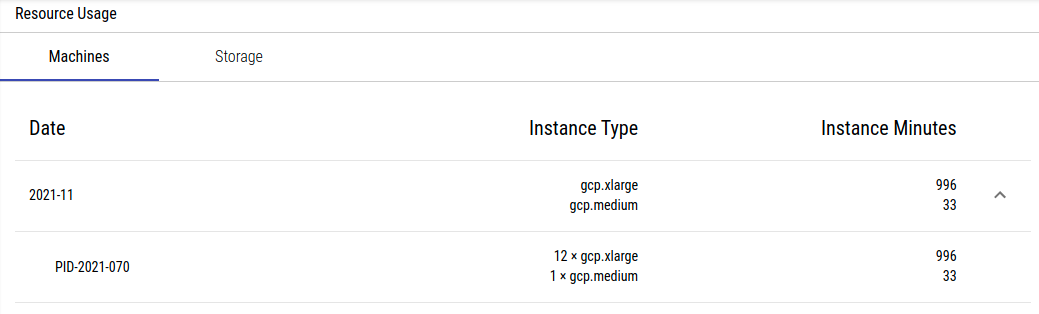 Expanded Machine Usage Overview, showing the machine time used per project.
This screen lists the spent machine hours and occupied storage for this project for your information. Note that this screen is not visible to users with the project role Reviewer or Guest.
Project Resource Usage
In addition to the resource usage overview for the whole organization, XTC offers you an overview for each load test project’s resource usage. To access this information, navigate to your load test project and click Resource Usage in the menu on the left.
This screen lists the spent machine hours and occupied storage for this project for your information. You will get one tab for machine minutes and another tab for storage space. Used storage is listed by day, while used machines are listed for each load test in this project, and by clicking the expand button on the right you may view more detailed data for this load test.
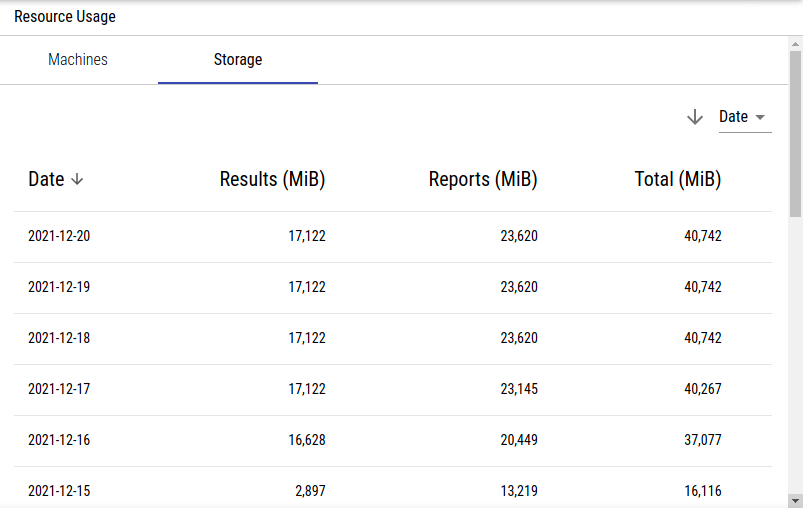 Storage Space Overview, listed per day.
 Machine Usage Overview, listed per load test.
 Expanded Machine Usage Overview, showing details of the load test machine usage.
AI Usage Tracking
For organizations and projects utilizing XTC’s integrated AI analysis features, XTC tracks AI consumption alongside traditional machine and storage resources:
- Analysis Requests: The number of automated and on-demand AI analysis sessions executed for load test runs.
- Organization & Project Aggregation: Track total token and analysis volume at the organization level with per-project breakdowns across monthly billing cycles.
- Role Visibility: Visible to organization administrators and billing managers under Organization > Resource Usage, and to testers under Project > Resource Usage.