10.0.x
Virtual Threads, Private Machine Mode, AI Data Report, Executive PDF, Groovy Scorecards, Reporting Improvements, HtmlUnit 5.x, Logback
XLT 10.0.0 (beta)
Version 10 is a major milestone release of XLT, currently in active beta. It leverages Java 21 LTS Virtual Threads as the default load execution model, upgrades reporting with AI Data Report (ai-data.md), Executive PDF Reports, the Groovy Scorecard DSL, Interactive Dynamic Overview Charts, and introduces Private Machine Mode for network-isolated testing behind corporate firewalls.
Framework
Virtual Threads Execution
XLT now uses virtual threads by default to execute load testing scenarios. Virtual threads, introduced in Java 21, are a lightweight alternative to traditional platform threads. They allow load test agents to scale to tens of thousands of concurrent users per agent machine with minimal memory overhead, eliminating the operating system thread limits of platform threads.
There is no change to the programming model: the developer-friendly synchronous “one-thread-per-user” paradigm remains identical.
Virtual threads are enabled by default. To fall back to platform threads, disable virtual threads in your test suite configuration:
com.xceptance.xlt.virtualThreads.enabled = falseFor details on configuration options, carrier thread scheduling, and capacity planning, see Virtual Threads and the Test Sizing How-To.
Carrier Thread Pool Sizing
Virtual threads run on underlying JVM carrier platform threads. If the JVM determines that more carrier threads are needed during high concurrency, it may spawn additional native threads up to the default limit (256). You can tune this limit in jvmargs.cfg:
-Djdk.virtualThreadScheduler.maxPoolSize=256Java Flight Recorder (JFR) Profiling
With the high concurrency made possible by virtual threads, understanding agent performance is critical. XLT agents can now be configured with low-overhead Java Flight Recorder (JFR) event tracing directly via jvmargs.cfg. For step-by-step instructions and recommended profiling presets, see the dedicated how-to on Profiling Load Tests with Java Flight Recorder (JFR).
Switch to the Logback Logging Framework
When virtual threads drive test users (default in XLT 10.x), load agents could deadlock during startup due to internal synchronization locks in Log4j 2. To ensure reliable execution under high virtual thread concurrency, XLT 10 has switched its default logging framework to Logback.
For migration instructions and sample configuration files, see Migrate Logging Configuration.
Private Machine Mode
Private Machine Mode enables running XLT agent controllers inside corporate firewalls, VPNs, or private VPCs without exposing any inbound public ports.
Upon startup, the agent controller establishes an outbound HTTPS reverse-tunnel to the XLT Relay (xtc-xlt-relay.xceptance.com:443). Commands and scenario dispatches flow securely over this tunnel, allowing private machines to be seamlessly mixed with public cloud agents.
For full architectural details, relay configuration, and security options, see the dedicated Private Machine Mode Guide.
Direct Access to Session Output Directory
In addition to getResultsDirectory(), the XLT Session class now provides getResultsOutputDirectory(). This method returns the session’s specific output directory within the main results directory, typically structured like ./results/<TestCase>/<UserNumber>/output/<Timestamp>.
You can use this directory to store custom diagnostic artifacts, screenshots, or dumps for the current session.
Reporting
Dynamic Overview Charts
The Dynamic Overview charts have been significantly improved:
- Time values are rendered in the report’s configured time zone rather than strictly UTC.
- The gray minimum-maximum band is preserved when zooming into chart areas.
- Hover tooltips display the instantaneous count/s throughput value.
 Image: Dynamic Overview Charts
For configuration options, see Dynamic Overview Charts.
Multi-Moving Averages
The Averages chart now supports multiple concurrent moving averages alongside the standard moving average. Look-behind windows can be defined by a percentage of previous values (e.g. 5%, 10%) or by an explicit time window (e.g. 10m). Moving average series lines start from the very first data point rather than waiting for a full window:
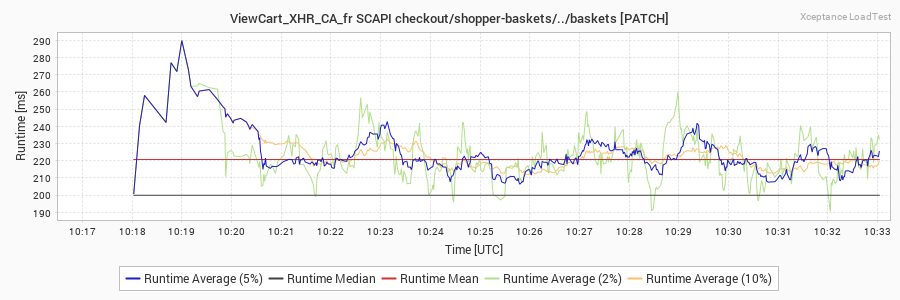 Image: An Example of the New Averages Display
Configure multiple moving averages in <xlt>/config/reportgenerator.properties:
## The standard moving average with a window of 5% of the values.
com.xceptance.xlt.reportgenerator.charts.commonAverage.type = percentage
com.xceptance.xlt.reportgenerator.charts.commonAverage.value = 5%

## An additional moving average with a window of 10% of the values.
com.xceptance.xlt.reportgenerator.charts.averages.1.type = percentage
com.xceptance.xlt.reportgenerator.charts.averages.1.value = 10%

## An additional moving average with a window of 10 minutes.
com.xceptance.xlt.reportgenerator.charts.averages.2.type = time
com.xceptance.xlt.reportgenerator.charts.averages.2.value = 10m
For more charting configuration options, see Moving Averages in Charts.
Groovy Expressions in Properties
Properties files now support dynamic expressions via Groovy evaluation using the #{...} syntax. Expressions can perform calculations (such as proportional user allocations based on a master variable), evaluate conditional environments, and reference other properties recursively:
totalUsers = 100
browse.users = #{ (${totalUsers} * 0.40).intValue() }
search.users = #{ (${browse.users} * 2).intValue() }
Evaluations execute in a secure sandbox with standard mathematical and utility functions available. For syntax rules, chained references, and security restrictions, see Dynamic Property Expansion with Groovy.
Rich Markdown in Test Comments
Test comments configured in test properties or passed via MasterController (-c) now support rich GitHub-flavored Markdown by prefixing the text with ::markdown::. The report renders headings, formatted tables, bulleted lists, and code blocks using report design tokens. Multiple comments (comment.1, comment.2) are sorted lexicographically, and whitespace-only comments are safely ignored.
For configuration details and cross-report integration, see Markdown Comments in Reports.
AI Data Report (ai-data.md)
The report generator automatically outputs an AI-ready Markdown export (ai-data.md) designed specifically for Large Language Models (LLMs) and automated agents. It provides a YAML metadata header, an 11-column time-series metrics table, semantic label aggregations, warmup vs. steady-state separation, and verbatim author comments (<rawComments>) formatted for zero token waste.
For complete schema details, metric definitions, and LLM analysis recipes, see the dedicated AI Data Report Guide.
Executive PDF Reports
XLT can now generate a printable, executive-ready PDF report (load-report.pdf) directly alongside the HTML report. Generation is 100% pure Java using OpenHTMLtoPDF and Apache PDFBox with zero external browsers or native OS dependencies. Charts rendered in WebP format are automatically transcoded to PNG in memory on the fly. Enable PDF generation using the --pdf flag:
./bin/create_report.sh --pdf ./results/20260901-100000For document structure, CSS Paged Media styling, and configuration options, see Executive PDF Reports.
External Ratings & Executive Evaluation
In addition to automated scorecard checks, test reports support external rating and evaluation injection from CI/CD gates or AI agents. The report renders a prominent 6-segment rating bar (A+, A, B, C, D, F), a summary line, and rich multi-paragraph Markdown assessment notes:
./bin/create_report.sh --pdf \
    --rating-score A \
    --rating-summary "All SLAs satisfied; latency remained under 500 ms." \
    ./results/20260901-100000
For property mappings, Markdown escaping rules, and CLI precedence, see External Ratings & Executive Evaluation.
Groovy Scorecard DSL
Automated quality gating has been completely redesigned with a programmable Groovy DSL (scorecard.groovy). Features include fluent assertions (isLessThan, matchesRegex), the xpathBuilder helper library for instant metric queries, live testreport.xml data querying (data.getList(...)), dynamic rule generation, and post-run tuning via update_scorecard.sh.
For complete DSL syntax, fluent assertions, and the xpathBuilder cheat sheet, see the dedicated Scorecard Guide.
Semantic Labeling Rules
XLT 10 introduces non-destructive Labeling Rules. Unlike Merge Rules (which collapse or rename requests), Labeling Rules attach space-separated metadata tags to transactions, actions, and requests based on regex or plaintext matching, enabling multidimensional filtering, colorization, and AI report slicing.
For rule syntax, regex patterns, and report filtering examples, see the dedicated Semantic Labeling Rules Guide.
Test Suite Migration
Follow these steps when migrating existing test suites from XLT 9.x to XLT 10.
1. JDK 21 Upgrade
Ensure JDK 21 is installed on all development workstations, CI/CD runners, and load test machines. Update your Maven pom.xml compiler target:
<properties>
    <maven.compiler.source>21</maven.compiler.source>
    <maven.compiler.target>21</maven.compiler.target>
</properties>
2. Refactor ThreadGroup Context Lookups
Virtual threads are not created within a ThreadGroup. If your test suite or libraries use ThreadGroup to look up context or share data across threads, refactor the code to use InheritableThreadLocal:
// Legacy ThreadGroup lookup
private static final Map<ThreadGroup, Context> CONTEXTS = new ConcurrentHashMap<>(101);

// Refactored context sharing for Virtual Threads
private static final InheritableThreadLocal<Context> CONTEXTS = new InheritableThreadLocal<>();3. Update WebDriver Initialization
The deprecated FirefoxBinary and FirefoxProfile setters have been removed from XltFirefoxDriver.Builder. Pass FirefoxOptions instead:
FirefoxOptions options = new FirefoxOptions();
// Configure profile and binary on options
XltFirefoxDriver driver = new XltFirefoxDriver(options);
4. Update Report Provider Moving Averages
The ReportProviderConfiguration interface no longer provides int getMovingAveragePercentage(). Update custom providers to use:
MovingAverageConfiguration getCommonMovingAverageConfig()List<MovingAverageConfiguration> getAdditionalMovingAverageConfigs()
5. Update HtmlUnit 5.x Utilities
HtmlUnit has been upgraded to 5.x. The deprecated HttpClientConverter.nameValuePairsToHttpClient(List) method has been replaced by HttpUtils.toQueryFormFields(List, Charset).
6. Review Report Generator Configuration
Update your <xlt>/config/reportgenerator.properties to adopt the new commonAverage and averages.<n> property format.
7. Migrate Logging Configuration
Adjust the logging configuration in your test suites for Logback. While core concepts are similar to Log4j 2, file names and XML configuration syntax differ. See below for example configurations:
Configuration for load test mode (<testsuite>/config/logback.xml):
<?xml version="1.0" encoding="UTF-8"?>
<configuration>
    <!-- Rolling File Appender -->
    <appender name="File" class="ch.qos.logback.core.rolling.RollingFileAppender">
        <file>${com.xceptance.xlt.agent.home}/results/agent.log</file>
        <rollingPolicy class="ch.qos.logback.core.rolling.FixedWindowRollingPolicy">
            <fileNamePattern>${com.xceptance.xlt.agent.home}/results/agent-%i.log</fileNamePattern>
            <minIndex>1</minIndex>
            <maxIndex>9</maxIndex>
        </rollingPolicy>
        <triggeringPolicy class="ch.qos.logback.core.rolling.SizeBasedTriggeringPolicy">
            <maxFileSize>10MB</maxFileSize>
        </triggeringPolicy>
        <encoder>
            <pattern>[%d{yyyy/MM/dd-HH:mm:ss.SSS}] %-5p [%t] %c - %m%n</pattern>
        </encoder>
    </appender>
    <!-- Custom Loggers -->
    <logger name="runtime" level="WARN" />
    <logger name="com.xceptance" level="WARN" />
    <logger name="org.htmlunit" level="WARN" />
    <!-- Suppressed Loggers -->
    <logger name="org.htmlunit.IncorrectnessListenerImpl" level="OFF" />
    <logger name="org.htmlunit.DefaultCssErrorHandler" level="OFF" />
    <logger name="org.htmlunit.javascript.StrictErrorReporter" level="OFF" />
    <logger name="org.htmlunit.javascript.host.css.CSSRule" level="OFF" />
    <!-- Root Logger -->
    <root level="WARN">
        <appender-ref ref="File" />
    </root>
</configuration>
Configuration for dev mode (<testsuite>/src/test/resources/logback-test.xml):
<?xml version="1.0" encoding="UTF-8"?>
<configuration>
    <!-- Console Appender -->
    <appender name="Console" class="ch.qos.logback.core.ConsoleAppender">
        <encoder>
            <pattern>[%d{HH:mm:ss.SSS}] %-5p [%t] - %m%n</pattern>
        </encoder>
    </appender>
    <!-- Custom Loggers -->
    <logger name="runtime" level="DEBUG" />
    <logger name="com.xceptance" level="DEBUG" />
    <logger name="org.htmlunit" level="DEBUG" />
    <!-- Root Logger -->
    <root level="INFO">
        <appender-ref ref="Console" />
    </root>
</configuration>
Beta History
| Beta Release | Highlights |
|---|---|
| 10.0.0-beta-1 | Java 21 Virtual Threads execution engine, multiple moving averages, Dynamic Overview chart improvements. |
| 10.0.0-beta-2 | Private Machine mode, labeling for transactions/actions/requests, Markdown support for test comments. |
| 10.0.0-beta-3 | Dynamic Groovy property evaluation. |
| 10.0.0-beta-4 | AI Data export for LLMs, Groovy Scorecard DSL. |
| 10.0.0-beta-5 | Executive PDF load test report, removal of the support for XML script test cases, HtmlUnit 5.x. |
| 10.0.0-beta-6 | Fix for a regression in the trend report generator. |
| 10.0.0-beta-7 | Logback as the new logging framework, direct access to the XLT session’s output directory. |