Page Objects
This section focuses on code readability, maintainability, and reusability. While not mandatory for Neodymium test development, these goals are best achieved by implementing the Page Object Model and leveraging Allure’s @Step() annotations to improve report clarity.
Page Object Model
The Page Object Model (POM) is a design pattern used to wrap all elements and functionality of a web page into an object. The main goal is to reduce duplicate code and support reusability.
Initially, our Example Test contained all element locators and page interactions directly. To apply the Page Object Model pattern, Page Objects are created for the HomePage, ProductListingPage (PLP), and ProductDetailPage (PDP), leading to this updated test code:
import com.codeborne.selenide.Selenide;
import com.xceptance.neodymium.common.browser.Browser;
import com.xceptance.neodymium.junit5.NeodymiumTest;
import org.example.pageobjects.HomePage;
import org.example.pageobjects.ProductDetailPage;
import org.example.pageobjects.ProductListingPage;

@Browser
public class FirstTest
{
    @NeodymiumTest
    public void firstTest()
    {
        // open the test website
        Selenide.open("https://posters.xceptance.io:8443/");

        // interacting with elements and assert states
        // navigate to the category page
        HomePage homePage = new HomePage().assertExpectedPage();
        ProductListingPage productListingPage = homePage.openCategoryAtPosition(1);

        // get the first product name and select it
        String productName = productListingPage.getNameOfProductAtPosition(1);
        ProductDetailPage productDetailPage = productListingPage.openProductAtPosition(1);

        // validate the page
        productDetailPage.validateProductName(productName);
    }
}
Notice that page elements are no longer accessed directly; instead, Page Object functions are utilized. The HomePage example below demonstrates this. The locator from the FirstTest class has been moved to the page and parameterized, allowing it to open various categories.
Additionally, a unique homePageBanner element and an assertExpectedPage() function were added to ensure the test is on the correct page. Post-validation is beneficial for pinpointing test failures, but it should be focused and efficient.
import com.codeborne.selenide.SelenideElement;
import org.example.pageobjects.AbstractPageObject;

import static com.codeborne.selenide.Condition.visible;
import static com.codeborne.selenide.Selenide.$;

public class HomePage
{
    private final SelenideElement homePageBanner = $("#intro-text-homepage-banner");

    public HomePage assertExpectedPage()
    {
        homePageBanner.shouldBe(visible);
        return this;
    }

    public ProductListingPage openCategoryAtPosition(int position)
    {
        $("#category-picture-" + (position - 1)).scrollTo().click();
        return new ProductListingPage().assertExpectedPage();
    }
}
Shared Components
The Page Object Model pattern can be further extended to define shared components found on various pages. The header, which is consistent across all pages, serves as a good example.
import com.codeborne.selenide.SelenideElement;
import org.example.pageobjects.pages.ProductListingPage;
import org.openqa.selenium.Keys;

import static com.codeborne.selenide.Condition.visible;
import static com.codeborne.selenide.Selenide.$;

public class Header
{
    private final SelenideElement navigationBar = $("#header-navigation-bar");

    private final SelenideElement searchInput = $("#header-search-text");

    public Header assertComponentAvailable()
    {
        navigationBar.shouldBe(visible);
        return this;
    }

    public ProductListingPage searchForSearchTerm(String searchTerm)
    {
        searchInput.sendKeys(searchTerm);
        searchInput.press(Keys.ENTER);
        return new ProductListingPage().assertExpectedPage();
    }
}
An AbstractPageObject can be created that all Page Objects extend, allowing the addition of the header to all pages without duplicating code.
import org.example.pageobjects.components.Header;

public class AbstractPageObject
{
    public Header header = new Header();
}
Step Annotations
Integrating Allure’s @Step() annotations with the Page Object Model enhances test reports. These annotations allow for descriptive function naming and improved report structure. Simply apply them directly to the functions you want to document.
For example, the HomePage from our previous example is modified as follows:
import io.qameta.allure.Step;
...

public class HomePage
{
    ...

    @Step("assert this is a HomePage")
    public HomePage assertExpectedPage()
    {
        ...
    }

    @Step("open category at position {position}")
    public ProductListingPage openCategoryAtPosition(int position)
    {
        ...
    }
}
The flexibility of @Step() annotations allows parameterization, enriching the report with more context. In the HomePage example, the @Step() annotation of openCategoryAtPosition() is parameterized, and the position parameter is automatically added to the report.
Here is what the FirstTest report looks like after integrating the Page Object Model and Allure’s @Step() annotations:
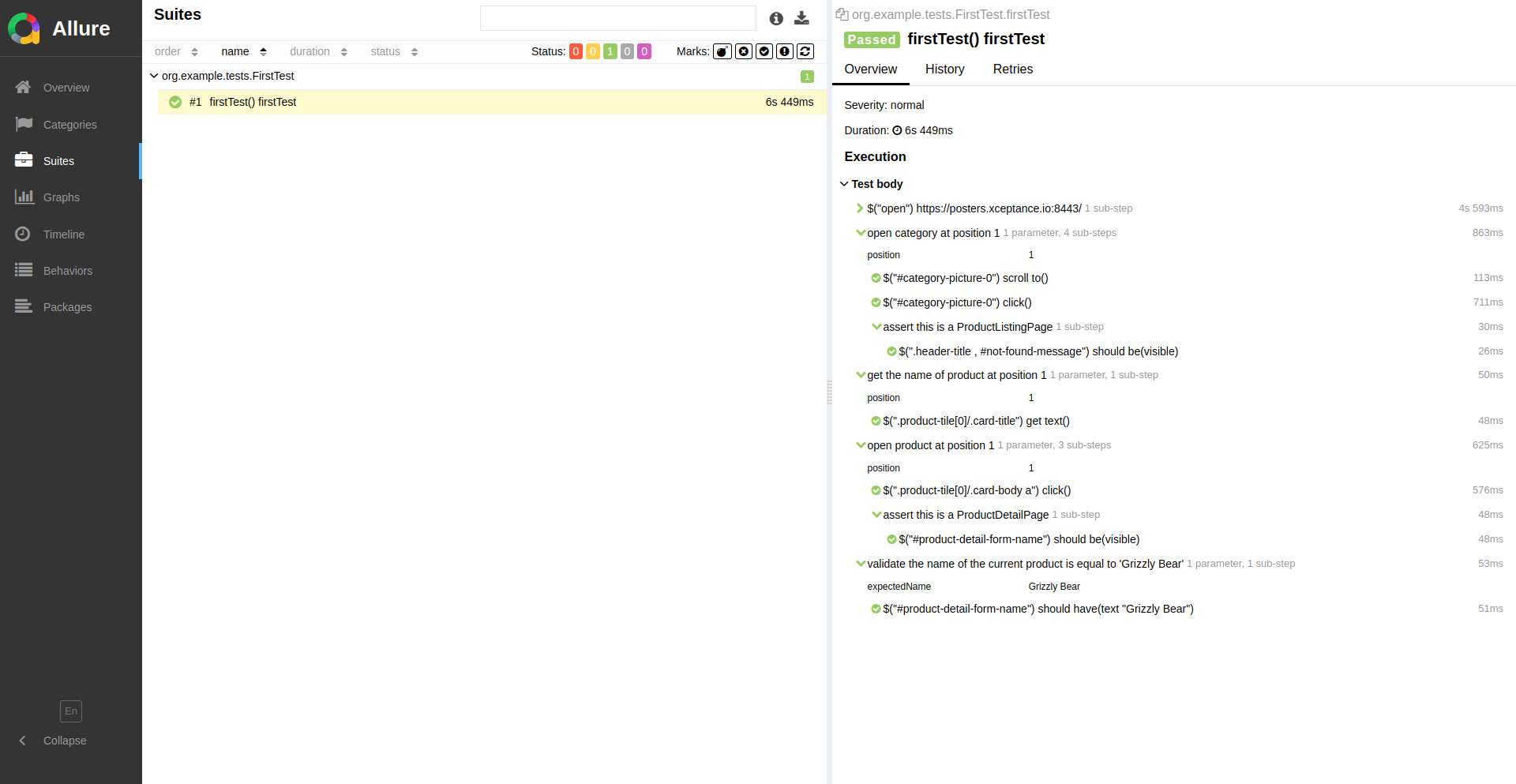
Improved report for the example test FirstTest with additional Step annotations.